Maintenance
Your full service history, in one place.
Every oil change, brake job, tire rotation, and custom service — logged with the details that matter and ready to search.
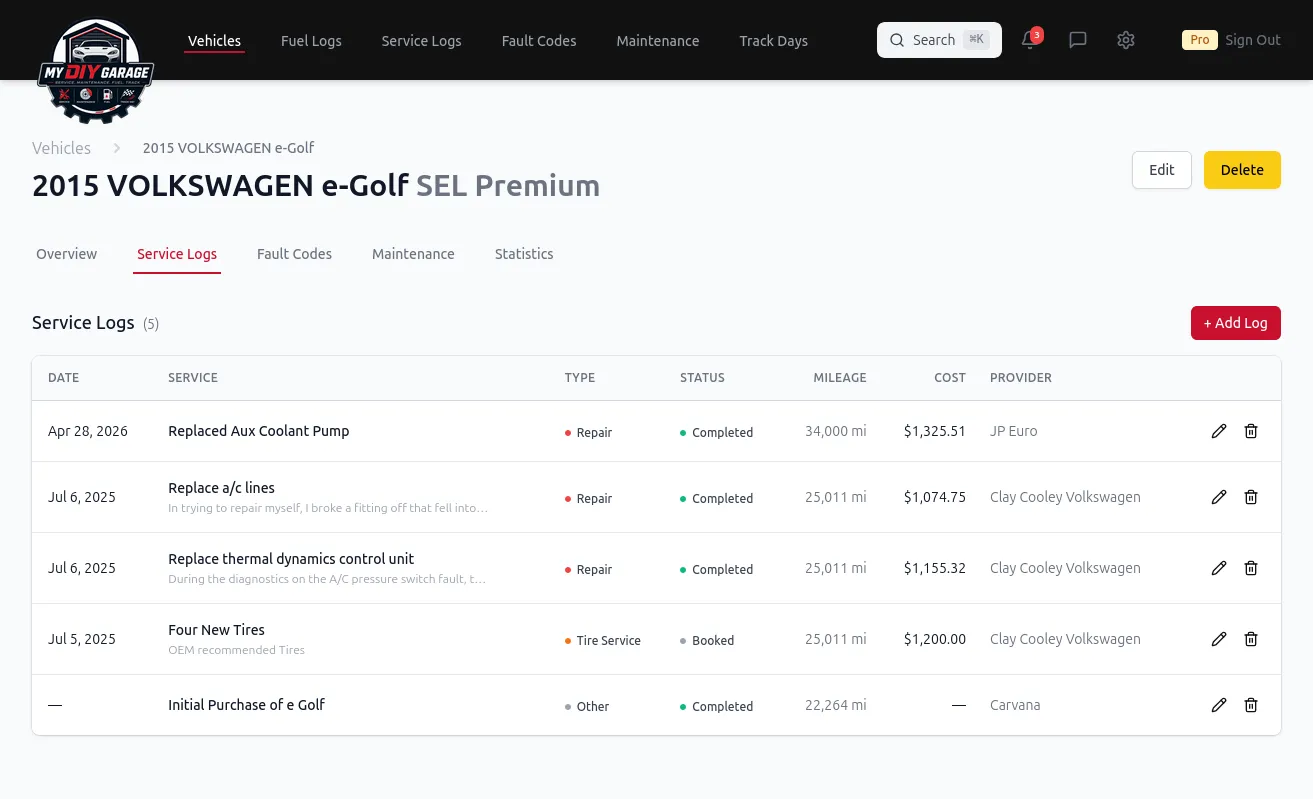
Log every service with mileage, date, cost, and notes — then let editable maintenance schedules tell you what is coming due next. One searchable history per vehicle, finally.
Every oil change, brake job, tire rotation, and custom service — logged with the details that matter and ready to search.
The problems every car owner runs into — and how MyDIYGarage solves them.
The problem: Was that oil change 4,000 miles ago or 9,000? The receipt is somewhere in the glove box, if you kept it at all.
How MDG helps: Log each service once with date and mileage, and your history is always a tap away — no shoebox of receipts required.
The problem: Different intervals for oil, brake fluid, coolant, timing belts — keeping them straight across cars is a full-time job.
How MDG helps: Editable maintenance schedules with mileage- and date-based intervals surface what's due next, so nothing slips.
The problem: You have no idea how much you've actually spent keeping a car on the road over the years.
How MDG helps: Every record carries a cost, so you can see lifetime spend per vehicle — gold for repair-vs-replace decisions and resale.
A maintenance log is only useful if it is complete and easy to keep, so MyDIYGarage is built around a single fast action: record a service the moment it happens. Each entry captures the work performed, the date, the odometer reading, the cost, and a free-text note for parts, fluids, or anything you want to remember next time.
Every record is filed under the specific vehicle it belongs to, so a household with three cars keeps three separate, clean histories instead of one tangled spreadsheet. Because each entry carries mileage and date, your log doubles as the data source for maintenance schedules — the same records that tell you what you have already done are what let the app work out what is coming due next. Nothing is entered twice.
The result is a durable service log you can search in seconds: every oil change, brake job, tire rotation, fluid flush, battery, belt, and custom repair, all in one timeline you actually trust.
Say you change the oil on your daily driver at 62,400 miles. In MyDIYGarage you add a service entry: type Oil & filter change, date today, odometer 62,400, cost $48 in parts, and a note — 5W-30 full synthetic, 5.2 qt, OEM filter, drain plug torqued to 25 ft-lb. Two minutes, done.
Six months and 5,000 miles later, the question "when did I last do the oil, and what did I use?" has an exact answer instead of a guess. A year after that, when you sell the car, that one entry is part of a complete, dated record a careful buyer will pay more for. And across the life of the vehicle, the running cost on every entry adds up to a real number for what the car has cost you to keep — the number that actually drives repair-versus-replace decisions.
Manufacturers set their own intervals, and your owner's manual always wins — but these common ranges show the kind of schedule a good maintenance log tracks across a vehicle's life. MyDIYGarage's schedules are fully editable, so you can match the factory numbers or your own driving exactly.
| Service item | Typical interval | Why it matters |
|---|---|---|
| Engine oil & filter | 5,000–10,000 mi | Protects the engine; the most-skipped routine service |
| Tire rotation | 5,000–8,000 mi | Even tread wear and longer tire life |
| Brake fluid | 2–3 years | Absorbs moisture; old fluid fades and corrodes |
| Engine air filter | 15,000–30,000 mi | Airflow, economy, and throttle response |
| Cabin air filter | 15,000–25,000 mi | Airflow and air quality inside the cabin |
| Coolant | 5 years / 100,000 mi | Prevents overheating and cooling-system corrosion |
| Spark plugs | 30,000–100,000 mi | Smooth starts, economy, and clean combustion |
Log each of these as you do them and your service history stops being a stack of receipts and becomes the single source of truth for the car — what was done, when, at what mileage, and for how much.